Business web applications and internal software
Custom web application development for work that has outgrown disconnected tools.
studiogecko.dev builds responsive business web applications for internal operations, approvals, records, dashboards, portals, and workflows that need more structure than spreadsheets, inboxes, and generic software can provide.

Purposeful modules share navigation, permissions, and state instead of behaving like separate tools.
Service overview
What web applications should do for the business.
A custom web application is justified when the workflow itself matters: several people need a shared record, permissions affect what they can do, repeated handoffs need state, and the business cannot rely on one person's memory to keep work moving. The application should reduce ambiguity rather than digitize every existing habit.
The best first release focuses on a complete operational path. We define the users, records, actions, decisions, integrations, and exception states that make that path reliable, then design the interface around repeated work. Public marketing pages remain separate from private application areas so search visibility and access control do not conflict.
Problems solved
Important work is split across spreadsheets, inboxes, messages, and provider dashboards.
People re-enter the same information because systems do not share a controlled workflow.
Managers cannot see status, ownership, exceptions, or what needs attention next.
Clients or partners receive too much access or too little visibility.
Generic tools force the business into workarounds that create errors and support burden.
Private application routes and public marketing content are not separated safely.
What is included
Workflow discovery, user roles, process boundaries, records, and acceptance criteria
Information architecture for public entry points, private application areas, and administration
Responsive application UI with reusable navigation, forms, tables, cards, and complete states
Authentication, server-side authorization, validation, database constraints, and safe error handling
Supported integrations, notifications, file workflows, and automation where approved
Accessibility, performance, security-baseline, and cross-device quality assurance
Deployment, environment, ownership, operations, and maintenance documentation
Expected outcomes
One shared workflow with clearer status, ownership, and next actions.
Less re-entry and fewer manual handoffs between disconnected tools.
Role-aware access for owners, staff, clients, partners, or other approved users.
A responsive interface designed for the real frequency and density of operational work.
A maintainable technical foundation that can evolve without hiding ownership or dependencies.
A safer separation between public indexable pages and private application routes.
Process
A cleaner path from idea to launch.
Step 1
Observe the real workflow
We identify who performs the work, where information begins, which decisions matter, what exceptions occur, and how success is confirmed today.
Step 2
Model records and permissions
Users, organizations, records, statuses, relationships, actions, and access boundaries are defined before interface components make assumptions permanent.
Step 3
Design the repeated experience
Navigation, dashboards, forms, tables, search, filters, detail views, and mobile adaptations are designed around frequency, risk, and information density.
Step 4
Build in controlled releases
The application is implemented in vertical slices with server validation, authorization, loading, empty, error, recovery, and provider-failure states tested alongside the main path.
Step 5
Deploy and establish ownership
Production checks confirm routes, permissions, forms, data, integrations, monitoring, and backups. Documentation identifies accounts, responsibilities, support boundaries, and the next prioritized improvements.
How we think about the work
Decisions that keep the service useful after launch.
The workflow is the product
Custom software should encode a better operating decision, not reproduce every step of a broken manual process. Discovery distinguishes essential controls from historical habit.
Engagement can start with a technical plan
Complex applications benefit from a scoped discovery and architecture phase before a full build. That phase can identify risks, options, milestones, and whether custom development is warranted.
Pricing follows operational complexity
Roles, records, permissions, integrations, migration, files, reporting, offline needs, and support expectations shape cost. A written scope defines what is implemented now and what remains optional.
Timeline examples depend on scope
A focused internal request tool is smaller than a multi-role operational platform with migration and several integrations. Timing is presented as milestones and dependencies, not an unsupported fixed promise.
Security and reliability are designed in
Server authorization, validation, secrets, audit needs, backups, error handling, dependency review, and least-privilege access are matched to the application's risk. Specialist testing is added when required.
Ownership continues after launch
Source access, infrastructure, data, providers, licenses, documentation, maintenance, monitoring, and future development responsibilities are made explicit so the software remains supportable.
Technology with a job
Tools chosen for maintainability, security, and the workflow.
The stack is selected around the project rather than used as a sales checklist. These are technologies already present in the studiogecko.dev platform and the practical customer benefit each can provide.
Next.js
Supports a single application with server-rendered public pages, protected app routes, route metadata, and efficient code splitting.
React
Provides reusable interactive patterns for dashboards, forms, tables, filters, dialogs, and responsive application states.
TypeScript
Makes shared data, permissions, form contracts, and integration behavior easier to maintain and review.
Supabase and PostgreSQL
Provide authentication, relational data, storage, policies, and migrations for role-aware business applications in the current stack.
Resend
Supports approved transactional notifications and confirmations with secrets kept on the server.
DigitalOcean and GitHub
Support versioned changes, deployment environments, production configuration, and a repeatable release process.
An informed comparison
Custom web application or a collection of no-code tools?
No-code and configurable tools are valuable when the workflow is straightforward. A custom application becomes reasonable when ownership, permissions, data relationships, user experience, or operational reliability exceed those tools' safe boundaries.
Configured and no-code tools
They can launch quickly, reduce initial engineering, and solve common workflows. Complexity can appear later through duplicated data, fragile automations, platform limits, and unclear ownership across several subscriptions.
Custom web application
A custom application can unify the data model, access rules, product language, and critical workflow. It requires deliberate product ownership, security, hosting, maintenance, and future development.
Use the simplest reliable tool that supports the work. Build custom software when the workflow is durable, valuable, and too important to depend on accumulating workarounds.
Industry applications
The same service solves different operational problems.
Professional services
Custom applications can organize consultation intake, engagements, documents, approvals, deliverables, client visibility, and internal administration.
Startups and SaaS teams
A focused product can connect onboarding, role-aware workspaces, core records, notifications, administration, and support around one valuable workflow.
Home services
Operational tools can connect estimates, job context, files, scheduling handoffs, field updates, and customer communication.
Automotive businesses
Role-aware software can support lead operations, service workflows, internal approvals, commission logic, and management visibility.
Agencies and creative teams
Project requests, assets, reviews, approvals, status, client access, and ongoing support can share one controlled workspace.
Growing internal teams
A focused business application can replace a critical spreadsheet process without pretending to become a universal enterprise suite.
Related concept work
See the system in context.
Fictional brand
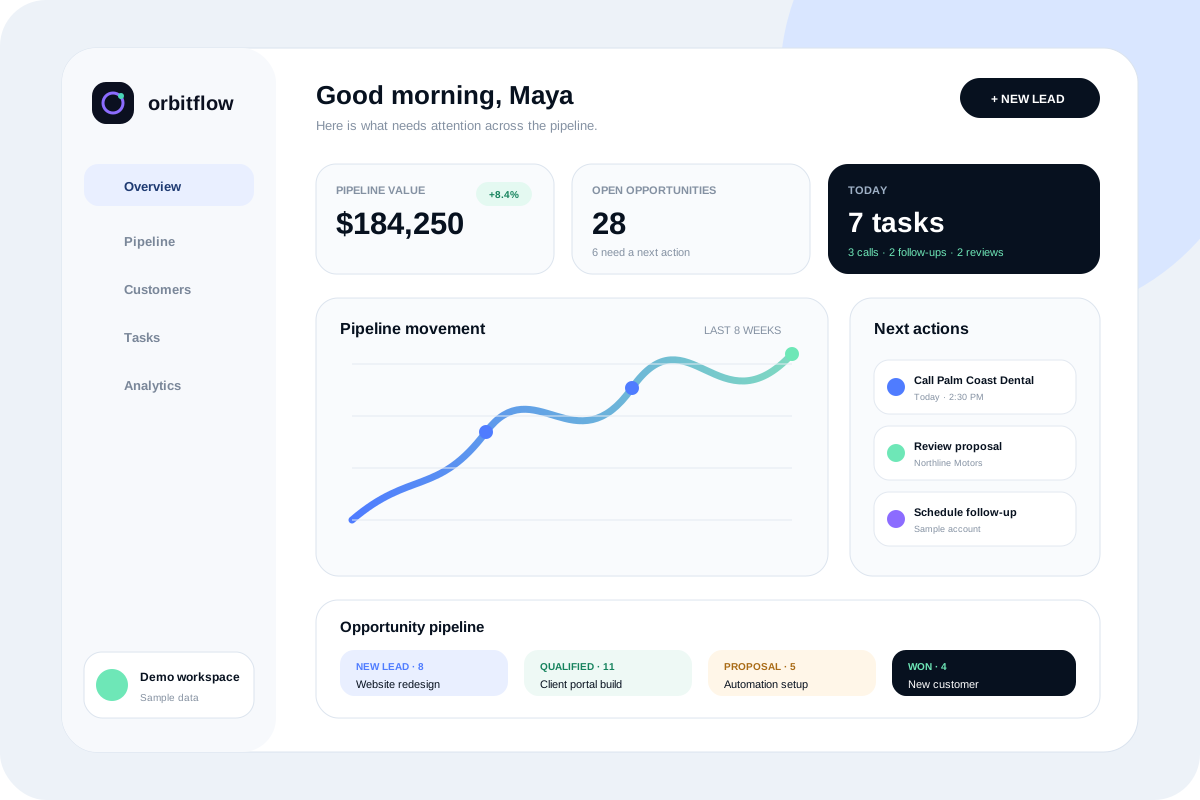
OrbitFlow
A crisp product site and responsive CRM dashboard concept that makes pipeline health, team tasks, reminders, and customer activity easy to understand.

Fictional brand
Northline Motors
A premium dealership concept centered on fast inventory discovery, clear vehicle details, financing pathways, trade-in interest, and mobile lead capture.
Questions before you start?
How much does custom web application development cost?
Cost depends on roles, workflows, data, permissions, integrations, migration, interface depth, reporting, and operational risk. Discovery produces a written scope and separates core work from future modules.
How long does a custom web application take to build?
A focused internal workflow can move faster than a multi-role platform with migration and integrations. Timing depends on decision readiness, access, content, testing, and the number of complete workflows in the first release.
What is the difference between a website and a web application?
A website primarily communicates public information and supports discovery or conversion. A web application manages authenticated interactions, records, permissions, state, and repeated operational work. One project may include both.
Can you replace a spreadsheet workflow?
Possibly. We first identify what the spreadsheet actually controls, which formulas and decisions matter, who edits it, where data comes from, and whether a custom application is more responsible than improving the current tool.
Can the application include a client portal?
Yes. Client access can be designed around approved requests, files, status, approvals, messages, or other records while keeping internal administration private.
Can the application connect to existing software?
Yes when the provider offers supported APIs or webhooks and the required access, limits, consent, data ownership, and failure handling are understood before implementation.
How are user roles and permissions handled?
Roles and record-level rules are defined from the workflow and enforced on the server. Hiding navigation alone is not treated as authorization.
Will the web application work on mobile devices?
Responsive behavior is designed around actual mobile tasks. Dense desktop workflows may adapt into focused cards, drawers, or staged actions rather than simply shrinking a large table.
How is application security addressed?
The scope may include authentication, authorization, input validation, secret management, dependency review, protected routes, error handling, and least-privilege access. Formal audits or compliance work require specialist engagement.
Who owns the code and infrastructure?
Repository access, source ownership, reusable components, hosting accounts, databases, licensed services, and support responsibilities are documented before work begins.
Can the application be expanded later?
Yes when the initial architecture and data model leave a responsible path. Future modules still require discovery and should not be represented as included until they are scoped and implemented.
What maintenance does a web application need?
Maintenance may include dependencies, hosting, database changes, backups, access review, error monitoring, integrations, content, performance, security updates, and continued testing of critical workflows.
A practical next step
Discuss whether web applications is the right fit.
Start with a free website audit or send the project context directly. You will receive a practical response without an automatic client relationship or unsupported outcome promises.