Custom CRM systems for real sales workflows
Custom CRM development that makes the next action clear.
studiogecko.dev builds custom CRM systems for businesses whose leads, relationships, tasks, and follow-up rules no longer fit a generic contact database or a collection of disconnected spreadsheets.

Customer history becomes useful when activity, ownership, and next actions stay connected.
Service overview
What crm development should do for the business.
A useful CRM reflects how opportunities actually move through the business. It defines where a lead comes from, what information is required, who owns the next action, which stages are meaningful, when follow-up is due, and what managers need to understand without reading every record.
Custom development is not automatically better than configuring an established CRM. It becomes valuable when the operating model is genuinely distinctive, integrations or permissions are central, or platform workarounds create more risk than a focused internal system. The goal is a dependable workflow, not a dashboard full of unused fields.
Problems solved
New inquiries arrive without consistent qualification or ownership.
Pipeline stages do not reflect real decisions, so records become stale.
Follow-up depends on personal reminders rather than visible tasks and rules.
Managers cannot distinguish active opportunities from incomplete or duplicated data.
Website forms and operational tools create disconnected records or manual entry.
Permissions expose too much information or prevent people from doing assigned work.
What is included
CRM discovery, pipeline definitions, lifecycle rules, roles, and data inventory
Lead intake, validation, source context, assignment, and duplicate-handling workflows
Responsive pipeline, contact, company, task, activity, and customer-profile interfaces
Role-aware access and server-side authorization for sensitive records and actions
Notifications, reminders, status automation, and supported API or webhook integrations
Operational reporting based on clearly defined fields and sample or real approved data
Migration planning, acceptance testing, deployment documentation, and maintenance scope
Expected outcomes
A consistent record of leads, relationships, activities, and next actions.
Clearer ownership and pipeline stages that reflect the actual operating process.
Less manual routing and fewer follow-ups that depend on individual memory.
Role-aware views that reduce noise while protecting sensitive information.
Reporting tied to defined data instead of decorative metrics.
A maintainable integration path between the public website and internal follow-up.
Process
A cleaner path from idea to launch.
Step 1
Audit the current sales operation
We map lead sources, stages, ownership, follow-up expectations, reporting needs, existing tools, data quality, and the decisions that currently happen outside the system.
Step 2
Define the CRM model
Contacts, organizations, opportunities, activities, tasks, assignments, permissions, and status rules are defined before screens and automations multiply.
Step 3
Prototype the daily workflow
The interface is designed around repeated work: reviewing new leads, updating stages, completing tasks, finding context, and understanding what requires attention.
Step 4
Build integrations and controls
Forms, notifications, imports, and supported provider connections are implemented with validation, duplicate handling, failure states, and server-side access checks.
Step 5
Migrate, verify, and adopt
Approved data is cleaned and tested, representative users validate the workflow, documentation clarifies ownership, and rollout avoids presenting unverified reports as business truth.
How we think about the work
Decisions that keep the service useful after launch.
Workflow determines the data model
The CRM is structured around the decisions people make, not a generic list of fields. Required data, stage changes, ownership, and activity history all need a business reason.
Engagement starts with an operational audit
A discovery phase can determine whether configuration, cleanup, integration, or custom development is the responsible solution before a larger build is approved.
Pricing follows workflow complexity
Roles, pipeline variants, migration quality, integrations, automations, reporting, and administration drive cost. The estimate separates core CRM operation from optional future modules.
Timeline depends on data readiness
A focused CRM can move faster when stages, owners, fields, and sample records are clear. Legacy cleanup, multiple teams, and integration dependencies add analysis and validation time.
Security follows record sensitivity
Access checks, export controls, authentication, secrets, activity history, validation, and retention decisions are matched to the information stored. Specialized compliance requirements need qualified review.
Ownership includes adoption
Source code and provider access matter, but a CRM also needs documentation, accountable data owners, field definitions, training, and a maintenance process to remain trustworthy after launch.
Technology with a job
Tools chosen for maintainability, security, and the workflow.
The stack is selected around the project rather than used as a sales checklist. These are technologies already present in the studiogecko.dev platform and the practical customer benefit each can provide.
Next.js and React
Support responsive pipeline, profile, task, and reporting experiences with server-rendered public entry points where appropriate.
TypeScript
Keeps lead, task, role, integration, and status contracts explicit across the application.
PostgreSQL
Models contacts, organizations, opportunities, activities, assignments, and reporting relationships with enforceable constraints.
Supabase
Provides authentication, database, and storage primitives for role-aware workflows in the current application stack.
Resend
Supports approved assignment notices, confirmations, and reminders without putting private record details into analytics events.
GitHub and DigitalOcean
Provide version history, repeatable deployments, environment controls, and a clear operational release path.
An informed comparison
Custom CRM or configured CRM platform?
A configured CRM is usually the best starting point when its model supports the business. Custom development should solve a durable workflow gap rather than recreate standard contact management at unnecessary cost.
Configured CRM platform
Established products offer broad features, integrations, support, and faster setup. Teams must align with the platform's model and may pay for capabilities or complexity they do not use.
Custom CRM system
A custom system can focus on exact roles, pipeline logic, data, and internal actions. The business also accepts responsibility for product ownership, maintenance, security, and future development.
Configure first when the process is conventional. Consider custom development when the operating model, permissions, integrations, or internal product value cannot be supported cleanly by a proven platform.
Industry applications
The same service solves different operational problems.
Automotive dealerships
A CRM can organize web leads, trade-in interest, department ownership, follow-up tasks, appointment context, and representative activity without claiming a live inventory integration.
Home services
Estimate requests, service areas, job types, scheduling context, follow-up, and maintenance opportunities can share one lead lifecycle.
Professional services
Consultation intake, qualification, engagement stages, documents, and relationship history require careful permissions and clear ownership.
Law firms
Consultation intake, conflict-review context, engagement stages, and relationship history need explicit access, ownership, and integration boundaries.
Agencies and studios
Opportunities can move from inquiry through discovery, proposal, onboarding, active work, and long-term support with appropriate context.
B2B software and product teams
Account relationships, multiple contacts, long sales cycles, tasks, notes, and stage definitions can be modeled around the actual buying process.
Related concept work
See the system in context.
Fictional brand
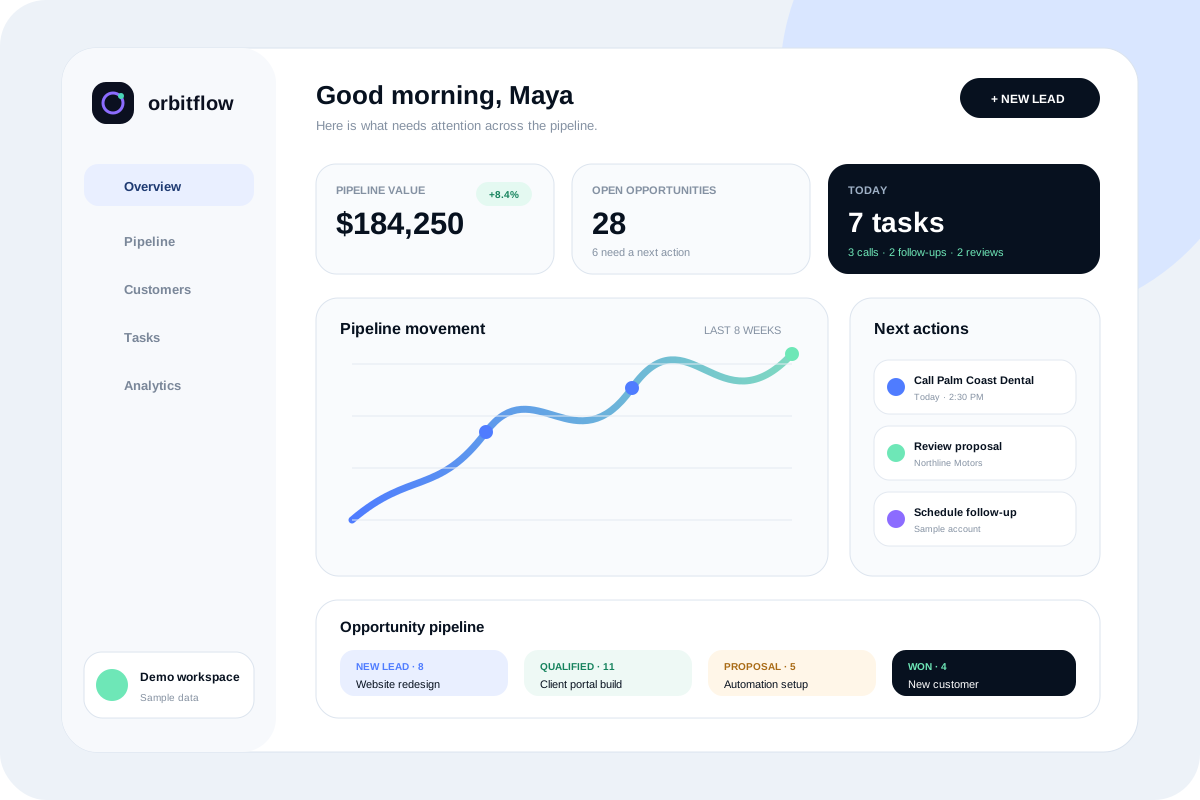
OrbitFlow
A crisp product site and responsive CRM dashboard concept that makes pipeline health, team tasks, reminders, and customer activity easy to understand.

Fictional brand
Northline Motors
A premium dealership concept centered on fast inventory discovery, clear vehicle details, financing pathways, trade-in interest, and mobile lead capture.
Questions before you start?
How much does custom CRM development cost?
Pricing depends on roles, pipeline variants, data relationships, migration, integrations, reporting, automations, administration, and support. Discovery defines a responsible scope before implementation.
How long does it take to build a custom CRM?
Timing depends on workflow clarity and data readiness. A focused lead and task system moves faster than a multi-team CRM with migration, advanced reporting, and several external integrations.
Should we build a custom CRM or configure an existing one?
Use an established CRM when it supports the process without harmful workarounds. Custom development is more appropriate when the workflow, roles, or product value are genuinely distinctive and worth owning.
Can website forms send leads into the CRM?
Yes. Forms can create validated records, preserve useful source context, apply assignment rules, and trigger approved notifications without sending personal form details to analytics.
Can the CRM automate lead assignment and follow-up?
Yes, when the rules, fallbacks, ownership, timing, and failure handling are defined. Automation should make responsibility clearer rather than silently moving records.
Can you migrate data from spreadsheets or another CRM?
Migration can be scoped after reviewing formats, duplicates, missing identifiers, field definitions, permissions, export limits, and cleanup responsibilities. Data is tested before a production cutover.
Can different teams see different records?
Role-aware access can limit records and actions by responsibility, organization, assignment, or other approved rules. Authorization is enforced server-side rather than treated as a hidden menu item.
What CRM reports can be included?
Reporting is based on reliable fields and clear definitions, such as source, stage, ownership, activity, and completion. The system should not present decorative metrics that the underlying data cannot support.
Can email or calendar tools be integrated?
Possibly, when the provider offers a supported API and the required consent, scopes, rate limits, retention, and failure behavior are understood. Integrations are not promised before that review.
How is CRM data secured?
Security may include authenticated access, server-side authorization, input validation, protected secrets, least-privilege roles, controlled exports, and activity history. Formal compliance and security audits require specialist scope.
Will our team receive training and documentation?
Handoff can include role-specific workflow guidance, field and stage definitions, access ownership, provider documentation, and an agreed process for support or future changes.
What happens after the CRM launches?
The business reviews adoption, data quality, failed workflows, support questions, and genuine reporting needs. Maintenance and future development are prioritized through a documented backlog.
A practical next step
Discuss whether crm development is the right fit.
Start with a free website audit or send the project context directly. You will receive a practical response without an automatic client relationship or unsupported outcome promises.